Switch Appliances
HP Spectre x360 13.3” Touch Laptop Core i7-1065G7 8GB 512GB SSD – Missing 7 Key
HP Spectre x360 13.3” Touch Laptop Core i7-1065G7 8GB 512GB SSD – Missing 7 Key
Regular price
£427.84 GBP
Regular price
Sale price
£427.84 GBP
Taxes included.
Quantity
Couldn't load pickup availability


HP Spectre x360 Core i7-1065G7 8GB 512GB SSD 13.3" Touchscreen (missing 7 key)
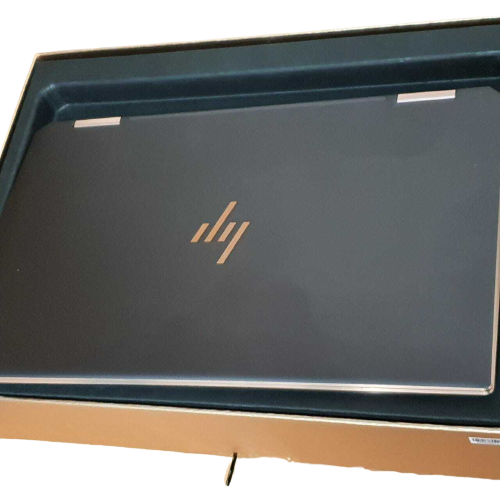
Ex-display item in excellent condition, has a missing “7” key and minor white pixels on the screen, but is fully working and not clearly visible (please see pictures for condition). Comes in original box
Specifications
| Processor | - Intel® Core™ i7-1065G7 Processor - Quad-core - 1.3 GHz / 3.9 GHz (Turbo Boost) - 8 MB cache |
|---|---|
| Display | Touchscreen:" Yes Screen size:" 13.3" Screen type:" IPS LCD Resolution:" Full HD 1920 x 1080p Screen features:" - WLED-backlit - Corning Gorilla Glass - HP Sure View integrated privacy screen |
| Memory | 8 GB LPDDR4 |
| Storage | 512 GB SSD |
| Software | Operating system installed: Windows 10 Operating system architecture: 64-bit |
| Power | Battery type :" 4-cell Lithium-ion Battery life :" Up to 19.5 hours |
Description
2-in-1 design transforms from laptop to tablet A 360-degree hinge lets switch the device from a laptop position into a more portable tablet-like form, so you've got the best of both worlds. In laptop mode it's easy to work on projects and edit documents. But if you're just browsing online or watching a show on the train, tablet mode has you covered. Built for power Powered by a 10th gen Intel® Core™ i7 processor, the HP Spectre x360 is perfect for multitasking. Able to handle any application, from video editing suites to CAD programs, it delivers smooth performance no matter what you're working on. A whopping 19.5 hours of power lets you use your laptop for the entire day on a single charge. Work on your documents and spreadsheets or run draining software without any fear of a flat battery. Fast loading times Never worry about running out of space for your files, movies and music. The HP Spectre x360 has 512 GB of storage, so you're able to download freely and enjoy the same consistent performance. And because it's an SSD drive, your laptop will start up and load everything in a matter of moments. Security There's added security features built in too - the Sure View privacy screen can be activated with a single key press, and you can disable your webcam when you're not using it using the Webcam Kill Switch